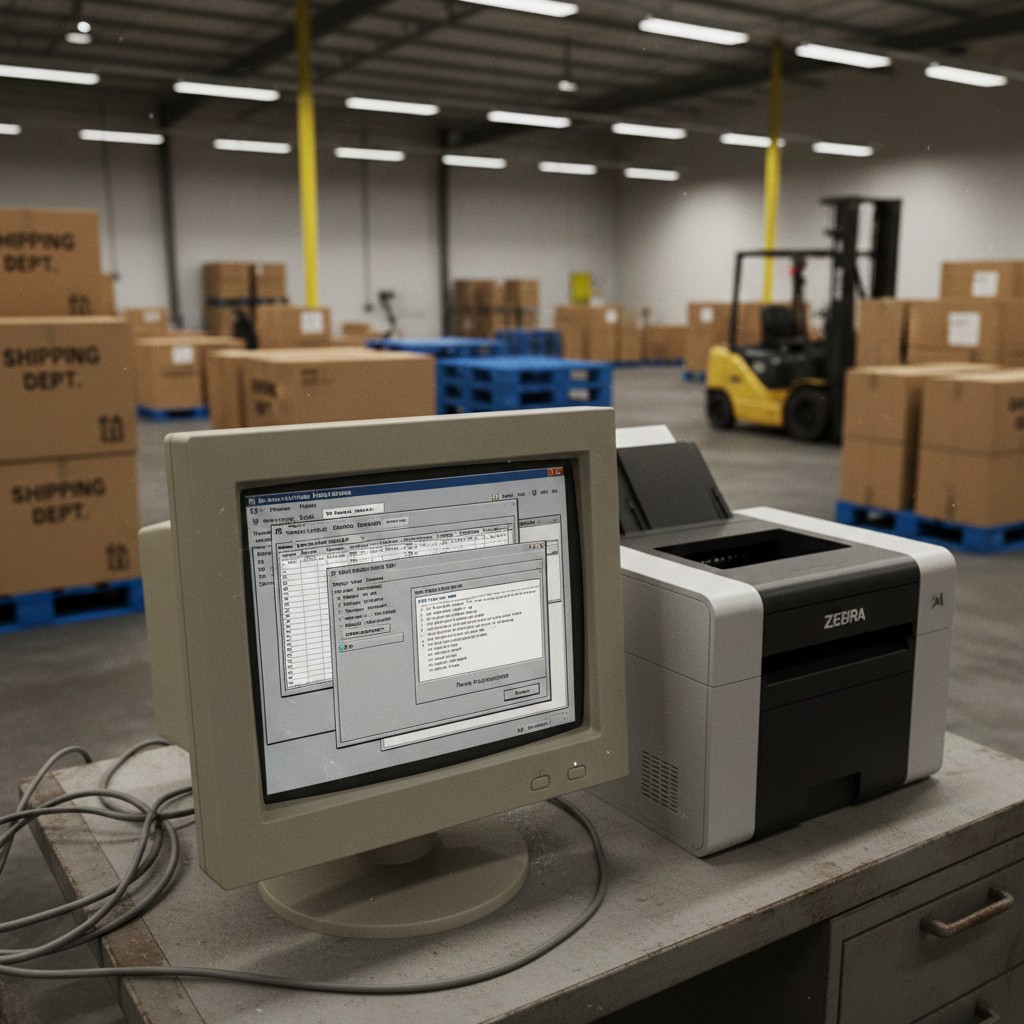
When people hear the term “legacy system,” they often picture a mainframe in a government agency or a banking platform written decades ago. These are common legacy system examples, but many others exist inside mid-market companies running everyday operations.
They run billing. They manage inventory. They generate financial reports. They power ERPs built in Visual FoxPro, dispatch systems written in VB6, and internal workflow tools developed in Delphi years ago.
In many companies, these systems remain critical to daily operations. They may not look modern, but they continue operating reliably, which is why they have stayed in place.
Understanding what qualifies as a legacy system, and what these systems actually look like in practice, is the first step in deciding what to do with them.
What Is a Legacy System? Definition and Examples
A legacy system is a business-critical application built on technology that is outdated, unsupported, or difficult to maintain, yet still actively used.
The word “legacy” does not mean broken. In fact, most legacy systems are stable and deeply embedded in operations. They’ve been customized over years to reflect how a company actually works. That’s why they’re difficult to replace.
A system typically becomes “legacy” when:
- The underlying platform is no longer supported by the vendor
- Security updates are limited or unavailable
- Fewer developers understand the language or framework
- Integration with modern tools becomes complex
- Infrastructure requirements are outdated
Examples include applications built on:
- Visual FoxPro
- Visual Basic 6 (VB6)
- Delphi
- COBOL
- Older versions of AS/400 or proprietary desktop frameworks
These technologies were powerful in their time. Many still perform their original functions well. The challenge is not that they fail daily. It’s that they become harder and riskier to evolve.
The Landscape: Legacy System Trends
While legacy software is often associated with big banks, the reality is that nearly every sector is grappling with aging infrastructure. According to the IPA 2024 Software Trends Survey (cited by NRI in early 2026), the prevalence of legacy systems remains staggering across diverse industries.
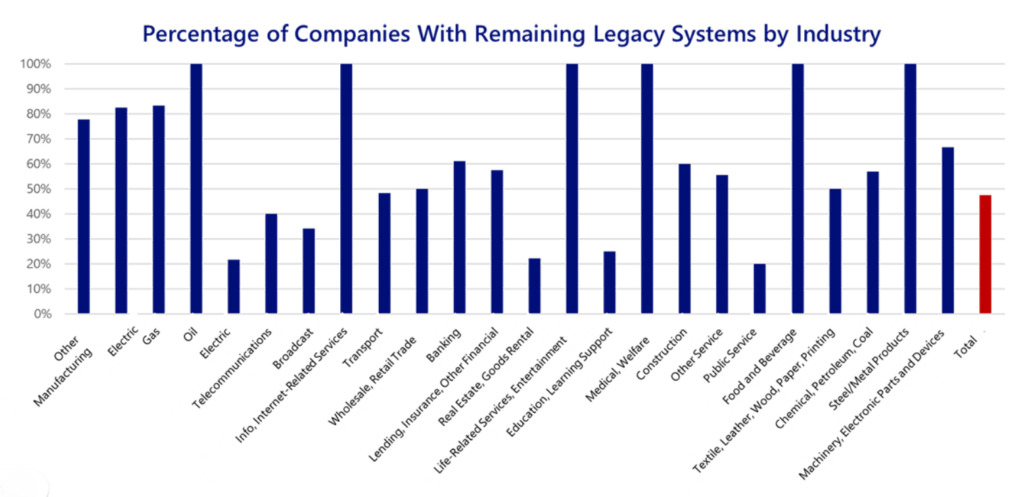
This data reveals a critical trend for mid-market leaders:
- Saturation in Core Sectors: Industries like Oil, Medical/Welfare, and Life-Related Services/Entertainment show a 100% rate of companies still maintaining legacy systems.
- Manufacturing Stagnation: Other Manufacturing, a primary user of custom FoxPro and VB6 tools, sits at nearly 80%, far higher than the overall average.
- The “Digital Cliff” Risk: With the total average of companies across all sectors hovering near 50%, organizations that fail to modernize by 2026 face what researchers call the “Digital Cliff,” where the cost of maintaining these systems finally outweighs the cost of a strategic transition.
Common Legacy Technologies Still in Use
Below is a high-level comparison of legacy technologies that are still widely used across industries.
| Technology | Typical Users | Approximate System Age | Why It Persists | Primary Risk |
|---|---|---|---|---|
| COBOL | Government agencies, large banks | 20–50+ years | Shrinking developer pool | Proven high-volume transaction reliability |
| AS/400 | Manufacturing, distribution | 15–30+ years | Integration limitations | Stable ERP backbone |
| Visual FoxPro (VFP) | Mid-market ERP, inventory, reporting | 10–25+ years | Highly customized workflows | Compatibility and security concerns |
| Visual Basic 6 (VB6) | Field service, billing, internal business tools | 15–25+ years | Embedded business logic | Unsupported runtime |
| Delphi | Desktop applications and internal utilities | 10–20+ years | Fast native applications | Limited modern ecosystem |
Some of these systems are decades old. Others were built in the early 2000s and have simply never been replaced. In many organizations, they represent years of operational knowledge encoded into software.
The fact that they still function is often what keeps them in place.
Real-World Environment Legacy System Examples
While large banks and federal agencies often dominate discussions about legacy software, many of the most common examples are found in mid-market organizations.
These systems are rarely headline-making. They are internal tools that quietly power daily operations.

Legacy System Examples Built in Visual FoxPro (VFP)
Many real-world legacy system examples appear in industries like logistics, industrial inspection, legal services, and higher education, where internal platforms built in Visual FoxPro (VFP) once powered critical operational workflows.
Over time, however, the architecture that once enabled growth can become difficult to maintain or extend.
Examples from real modernization projects include:
Logistics – Lodeso
A 15-year-old Visual FoxPro dispatch and order management system struggled to keep pace with growing order volumes at Lodeso. Staff were manually editing database tables to keep the system running. After modernization to C# and .NET, the platform now supports more than 9,000 monthly orders with dashboards and self-service tools.
Industrial Inspection – Industrial Inspection & Analysis (IIA)
Thousands of inspection records were stored in a legacy FoxPro platform that required manual document processing at Industrial Inspection & Analysis. A modernization project introduced a web platform using AI-powered document processing to accelerate reporting and eliminate manual data entry.
Higher Education – University of Southern California (USC)
A FoxPro database storing student records at University of Southern California (USC) dating back to the early 1900s required reverse engineering before it could be migrated into a modern system architecture while preserving decades of historical data.
These projects illustrate what many legacy system examples look like in practice: software that once supported critical operations but eventually requires modernization to remain sustainable.
Distribution and Billing Applications in Visual Basic 6 (VB6)
In distribution and field service businesses, VB6 applications remain a common legacy system example. These systems often handle:
- Dispatch scheduling
- Customer billing
- Inventory reconciliation
- Service ticket workflows
Because they were custom-built, they reflect the company’s actual processes. That specificity is valuable. It is also what makes them difficult to replace.
Over time, however, challenges emerge:
- Limited compatibility with modern operating systems
- Reporting that relies on outdated components
- Difficulty integrating with cloud-based platforms
The application still runs, but extending it requires increasing effort.
Internal Workflow Tools Built in Delphi
Delphi-based applications represent another common legacy system example, widely used to build fast, stable desktop applications. Many internal order management systems, compliance tracking tools, and reporting utilities were developed in Delphi.
In some organizations, these applications are used by only a handful of employees, yet they support essential workflows.
The challenge is not functionality. It is maintainability. As development environments evolve and developer familiarity declines, even small changes become costly.
COBOL Systems in Government and Banking
COBOL remains one of the most recognized legacy technologies. It is still used in government processing systems and large banking infrastructures.
These systems handle high-volume transactions reliably. Their risk profile centers less on performance and more on:
- Developer availability
- Rigid integration layers
- Complex modernization pathways
While COBOL systems are typically found in large institutions, the broader lesson applies across industries: longevity does not eliminate risk.
Why Companies Still Use Legacy Systems
In many organizations, legacy systems continue operating reliably in the roles they were originally designed to fill. They may not look modern, but they consistently perform core business functions.
Several factors contribute to their longevity:
- Significant historical investment
- Deeply embedded business logic
- Limited internal documentation
- Fear of operational disruption
- Budget cycles that prioritize new initiatives over infrastructure
For leadership teams, the decision is rarely emotional. It is practical. If the system continues to support daily operations, replacing it may not feel urgent.
The tipping point typically occurs when external pressures increase, such as integration demands, platform compatibility issues, or developer availability constraints.
Common Patterns Across Legacy Systems
Although technologies vary, legacy systems tend to share similar characteristics:
- Business rules are hard-coded rather than modular
- User interfaces are desktop-only
- Reporting logic is embedded in application code
- Integration with modern APIs is limited
- Data structures evolved organically over time
“What makes many legacy systems complex is not instability,” says Don Knoup, Senior Software Architect at Ticomix. “Business rules accumulate in layers over time, which makes even small changes more complex than they first appear.”
These patterns make incremental improvements difficult. Even small feature changes can require deep code revisions.
The risk is not immediate failure. It is reduced adaptability.
Legacy System Profile Snapshot
Many legacy systems share structural characteristics regardless of industry. When evaluating a system’s current state, organizations often observe:
- Deeply embedded business logic
- Limited separation between interface and data layers
- Custom reporting components built into application code
- Incremental integrations added over time
- Desktop-first architecture
- Evolving data models without formal redesign
These traits do not automatically indicate failure. However, they help explain why legacy systems can become difficult to adapt as operational demands change.
Signs It May Be Time to Evaluate Modernization
Organizations often reassess legacy systems when one or more of the following conditions appear:
- Platform support has officially ended
- Operating system updates create compatibility constraints
- Integrations require increasing custom development
- Performance limitations affect scalability
- Fewer developers are familiar with the underlying technology
At this stage, the discussion shifts from “Does it function?” to “Can it continue to adapt?” and helps to review common approaches to legacy application modernization.
How Modernization Approaches Have Evolved
Historically, replacing a legacy system often meant rebuilding it entirely from scratch. That approach carried significant cost and operational risk.
Today, modernization strategies are more flexible. Organizations may choose to:
- Incrementally refactor core components
- Replatform onto modern frameworks
- Introduce modular architecture while preserving existing workflows
- Use automated code analysis tools, including AI-assisted FoxPro conversion, to assist in reviewing and translating legacy codebases
Modernization is no longer a single, all-or-nothing decision. It is a strategic process that depends on architecture, complexity, and long-term business goals.
From Recognition to Planning
Recognizing a system as “legacy” does not automatically mean it must be replaced immediately. In many cases, the next step is evaluation — understanding architectural constraints, integration limitations, support status, and future scalability requirements.
For organizations running platforms such as FoxPro, VB6, or Delphi, this evaluation often reveals trade-offs between maintaining stability and improving adaptability. Some systems can be extended safely. Others reach a point where structured modernization becomes the more sustainable path.
Modernization strategies vary depending on technology stack, business impact, and operational tolerance for change. Exploring those options carefully can help reduce long-term risk while preserving the logic that makes existing systems valuable.
Conclusion
Legacy systems remain embedded in many industries because they were built to solve real business problems. They often reflect years of operational refinement and institutional knowledge.
The key question is not whether a system once worked well. It is whether it can continue to support evolving business requirements without increasing risk or complexity.
Understanding the types of legacy systems still in use, and the patterns they share, is the first step toward making informed decisions about their future.
Ticomix has worked with organizations modernizing FoxPro, VB6, and Delphi systems across industries, helping them transition thoughtfully rather than reactively.
Frequently Asked Questions About Legacy Systems
What is considered a legacy system?
A legacy system is a business-critical application built on outdated or unsupported technology that is still actively used. These systems often run essential processes such as billing, inventory management, reporting, or ERP functions, even though the underlying platform may no longer receive vendor support.
Are legacy systems still used today?
Yes. Legacy systems remain common across manufacturing, distribution, healthcare, government, and financial services. Many organizations continue using applications built in technologies like Visual FoxPro, VB6, Delphi, or COBOL because they still perform their original functions reliably.
Why do companies continue using legacy software?
Organizations often keep legacy software because it is stable, familiar to employees, and deeply aligned with existing workflows. Replacing it can feel risky, particularly when business logic has evolved over many years without formal documentation.
Does every legacy system need to be replaced?
No. Some legacy systems can continue operating effectively for years. The key consideration is whether the system can adapt to new requirements, integrate with modern tools, and remain maintainable as technology standards evolve.